Posts

Showing posts from January, 2009

Updating StockItem Master Names in Tally

UDIMagic v3.0 Release 1.81 supports a new tag named <OLDNAME> The tag <OLDNAME> when used along with the tag <NAME>, allows you to modify NAME's of existing MASTER-records in Tally. Here's a sample Excel sheet which contains StockItem Master-records wherein we have OLD-Names in Column-B and NEW-Names in Column A. The objective is to replace the StockItem Master-records having OLD-Names with the NEW-Names. And here are the XML tags to update / modify the STOCKITEM Master records with the NEW-Names. XML tags extracts:- <!-- Create STOCKITEM Masters --> <MASTER TYPE="STOCKITEM" > <NAME.LIST> <!-- NEW-Name for STOCKITEM --> <NAME COLUMNREFERENCE="A"/> <!-- OLD-Name for STOCKITEM --> <OLDNAME COLUMNREFERENCE="B"/> </NAME.LIST> <!-- PartNumber --> <ADDITIONALNAME COLUMNREFERENCE="C"/> <COSTINGMETHOD>Avg. Cost...
Debugging with UDI-Magic

Before we proceed with the task-on-hand, let's have a look at what way the UDI-Magic software functions. UDI-Magic functionality UDI-Magic is an EDI (Electronic Data interchange) tool that facilitates and involves the following :- 1) E xtract data from a data-source (herein MS-Excel) 2) T ransform the data 3) L oad it into the target (herein the Tally Accounting Software database) Tech-guys may refer this link for more information on ETL (Extract, Load and Transform) Debugging with UDI-Magic "Debugging with UDI-Magic" relates to the 3rd step (i.e. Load) in the Extract, Transform and Load method. At times (generally in case of errors) , we may need to see what is being uploaded into the Tally Software. UDI-Magic allows you to send the data into a file simultaneously as it is being uploaded into Tally. The steps for enabling debugging in UDI-Magic are given below :- Step 1 Open the UDIMagic.ini (configuration file) using Notepad. This file is their in the "c:\udi...

View the UDI-Magic Excel sheets templates in your browser

You can now directly view the Excel-sheet templates (formats) for UDI-Magic Software in your browser without downloading / unzipping the zip-files. Here's a sample Excel-sheet template for Stock-Item-Master with Multiple-Price-Levels . For other Excel-Sheet templates, visit http://www.rtslink.com/download-excel-sheets.html

UDIMagic v3.0 Release 1.78

Image
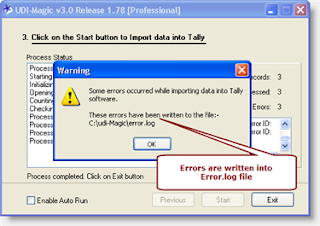
The new Release 1.78 includes improvements in error-reporting as given underneath :- 1) Errors occurred while importing MASTERs and VOUCHERs are shown separately. This enables us to easily identify the cause of the error. 2) Errors are now written in "error.log" apart from being displayed in a "Error-list-box". So if you get any errors while importing data, just go through the "error.log" file in folder "C:\udi-magic" or email the error.log file to support @ rtslink . com (remove spaces) along with your UDIMagic Software Serial Number.

SPEED Test - Tally 9 Release 3 Beta vs Tally 9 Release 2.14

We performed a speed-test by importing 5000 Ledger Masters into Tally Software using the UDI-Magic utility on a Intel Celeron 1.4 Ghz system having 1 GB RAM. And here are the results :- Speed Test - Tally 9 Release 3 Beta vs Tally 9 Release 2.14